An area manager isn't responsible for one store's numbers — they're responsible for whether dozens of stores, each with its own staff, inventory and compliance record, are on track at the same time. PerformanceIQ is the dashboard that job runs on: one place to see which stores need attention this week, not just how each one performed last month.
No single domain tells you what to do first
Store performance spans several operational domains — sales, staffing, inventory, store operations, and market context — while compliance issues can cut across them. Each produces different signals on a different cadence. Looked at separately, none tells an area manager what needs attention first. A store can be hitting its sales target and still be about to fail a compliance check; a staffing shortage in one store is invisible next to a healthy attendance average across the whole area. The difficulty isn't a lack of data. It's that no single view shows which of dozens of stores actually needs attention right now.
Lead with what's wrong, not a neutral summary
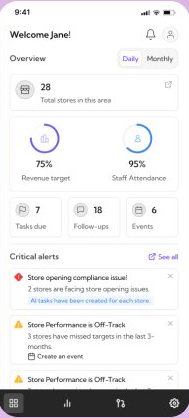
The overview doesn't open on a clean report of numbers. It opens on Critical alerts — a store opening compliance issue, stores off-track on performance — ranked above the KPI rings themselves. The dashboard's job isn't to report performance. It's to tell a manager, in the first few seconds, exactly where to look first.
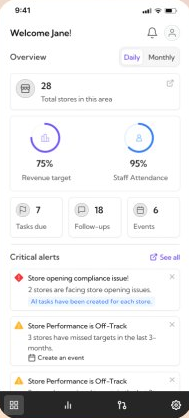
Five owned modules, not one long mixed feed
Below the alerts, the dashboard is organized into five modules — Sales Performance, Staff attendance, Inventory & stock, Store operations, Market & competition — each scoped to a single operational domain. Every module opens the same way: a headline number, a trend, and a “See suggested actions” link, so moving from the overview into any one category, a manager already knows the shape of what they'll find.
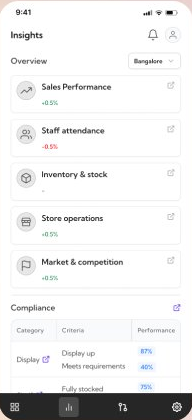
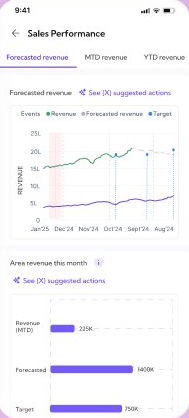
The suggested action isn't generic advice bolted onto a chart
In Inventory & stock, a flagged spike in replenishment time comes with a dated read of the underlying numbers — three hours to restock items after running low, two incidents that day — and one suggested action grounded in that read: reduce restocking time by optimizing the supply chain. The manager sees the evidence and the suggestion in the same view, not a report that arrives after the fact.
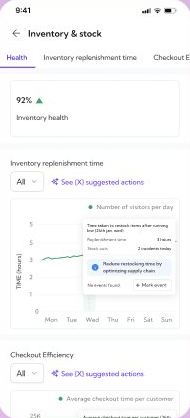
An alert doesn't dead-end at the overview
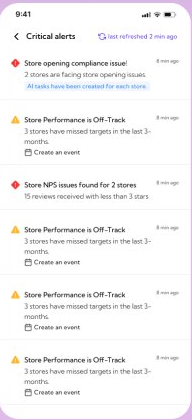
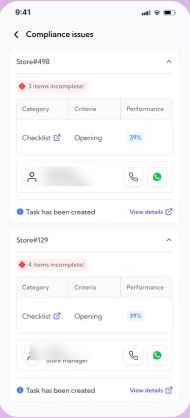
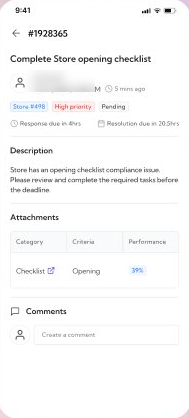
Tapping into Critical alerts opens the specific issue across affected stores; opening a store's Compliance issues shows exactly which checklist items are incomplete, with the store manager's contact one tap away; and opening a flagged task shows its full detail — description, attachments, deadline. Each level answers a more specific question without losing the thread back to where it started.
Flagged issues move directly into tracked work
“All tasks have been created for each store” — when an alert like this is confirmed, it produces a task for each affected store, and those tasks appear directly in the Operations Hub with priority, store and deadline attached where the alert supports it. The area manager isn't left to separately translate the finding into a to-do; the flagged issue already exists as trackable work.
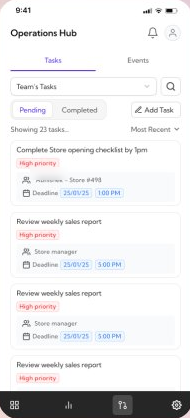
PerformanceIQ didn't just move existing reports onto a phone. It changed what a manager sees first — flagged issues instead of a full-store summary — and what happens after they see it: an alert becomes a task with an owner and a deadline, not a note to follow up on later. The system does the noticing; the manager still does the judgment.
If I revisited this now, I'd want to understand how managers actually triage when several critical alerts land at once — right now they're ordered by recency, not by which one has the most at stake. A smarter ranking, or letting managers weight the categories that matter most for their own stores, feels like the natural next layer on top of what's here.