When a retail brand expands into a new market, someone has to find the right property — walk the street, check the frontage, confirm the rent, judge whether the location fits what the brand needs. That sourcing work doesn't happen from one office. It's distributed across field brokers and BD staff, working across several brands and markets at once. MarketConnect is the system that coordinates that work.
A property lead is only useful if someone can act on it
A broker finding a promising site has no built-in reason to format it neatly — a photo, a price, an address is often all that reaches the brand side. That's workable for one lead. It gets harder to manage once submissions are coming in for several brands and markets at once, each with its own requirements: without shared structure, a BD reviewer has no consistent way to compare one submission against another or tell whether it has what a decision actually needs. The bottleneck wasn't finding properties. It was giving every submission enough shared structure to be compared, reviewed and acted on.
Treat every submission as a record moving through stages, not a one-off message
The shift was to stop designing around the moment a broker sends a lead, and start designing around the property's whole lifecycle — submitted, matched to a requirement, scored, reviewed, decided. Every role touching that property needed to see the same record at the stage it was actually in, instead of piecing it together from separate threads.
A broker's phone and a BD team's desk needed different tools, on the same data
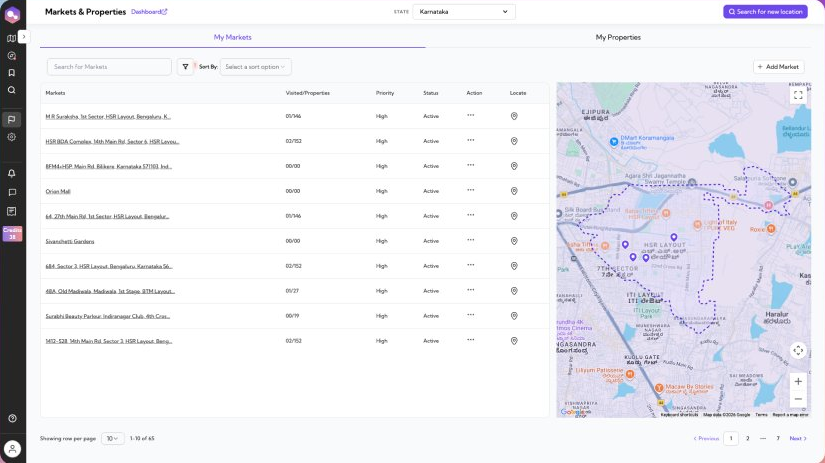
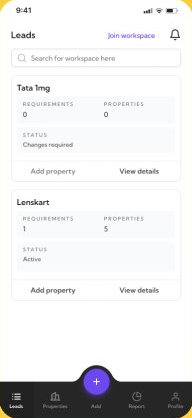
A field broker works from a phone, moving between sites — their view is a list of client workspaces, each with its own requirements and properties. A BD or ops reviewer works from a desk, comparing many markets at once — their view is a table paired with a live map, sortable by priority and status. Same pipeline, two interfaces built for how each role actually works.
Catch a weak submission before it enters the queue
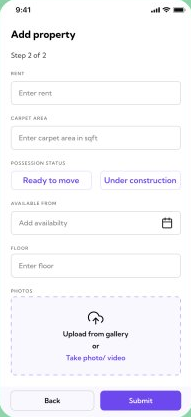
Property submission is two steps — location, then rent, carpet area, possession status and photos. Rather than let an incomplete submission go straight into review and get rejected later, MarketConnect checks it at the point of submission and tells the broker what would strengthen it: missing facade photos, a signage photo that would raise visibility, or confirmation that carpet area and rent already look right. The broker chooses — fix it now, or submit anyway.

Not every property needs the same amount of scrutiny
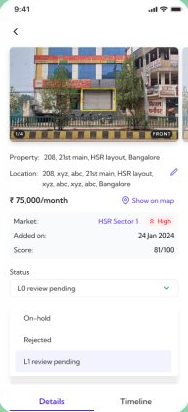
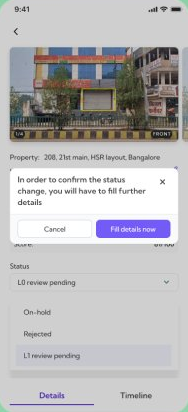
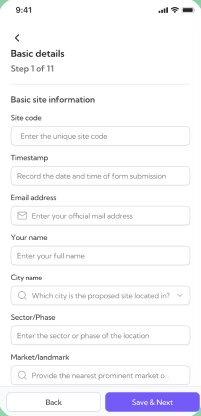
A submitted property starts at L0. Moving it further — toward L1 review, on-hold, or rejected — isn't a dropdown flip. Changing status triggers a required structured assessment: 11 steps covering basic site information through to competitor analysis and market overview, so a property can't advance to a deeper review stage without the data that stage actually needs to make a call.

A property only means something in the context of its market
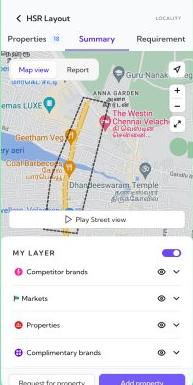
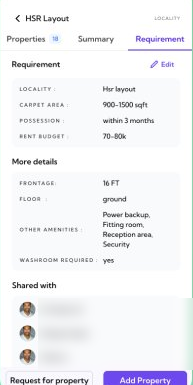
Every requirement sits inside a catchment map, with competitor brands, existing markets, other properties and complementary brands each toggleable as a layer — so a review isn't judging one address in isolation, it's judging its position against everything around it. A requirement can also be shared directly with the specific brokers already working it, so a reviewer knows who's involved without another message thread.
MarketConnect didn't reduce how much work goes into finding and vetting a property — that part is still real, human work. What changed is that the work became visible and comparable: every submission carries the same structure, every stage change carries the data that stage needs, and a broker, a BD reviewer and a brand workspace are all looking at the same record instead of a fragmented thread.
If I revisited it now, I'd want tighter feedback loops on why a submission stalls at a review stage instead of just showing its current status, and a lighter version of the 11-step gate for properties that clearly don't need that much scrutiny — right now every property earns the same depth of process, whether or not it needs it.